Posts

Pleasant greetings to your and yours in the New Year! In this article, I'm going to talk about using PowerShell to identify Microsoft Teams without owners. Behind every team in Microsoft Teams is a M365 Group. The group contains both owners and members. M365 Groups can create governance issues - especially when owners leave and there isn't a secondary owner. If you're like me, you've dealt with this problem. In my case, I decided to write a script to go thru all the M365 Groups in my tenant and create a report with the name, email, members, and creation date for each group used by a team. The script is available in my GitHub . Here's a screenshot of the report produced by the script: NOTE: The attached CSV contains the same data as the table in the report. Hopefully you find this script useful. Cheers!
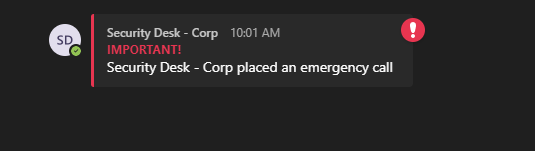
Teams has the capability to send a notification when an emergency call is placed. When I was setting up this feature in my company's tenant, I tried finding a picture of what the notification looks like from the Teams desktop and mobile clients. I was frustrated when I couldn't find anything, so I hope to share this info with others that were in my place. In the United States, it's typical for a police officer to be dispatched when someone calls 911. One way to avoid having an officer sent is to call the Police Department Non-Emergency number and organize a test call. Some police departments will give you a specified date and time to make your test call, while others will simply notify their operators beforehand. Regardless, my advice is to make sure you contact the Non-Emergency number prior to testing. To s...

Microsoft announced they would change Teams meeting recordings to auto-expire after 60 days. A guide for this change along with a FAQ was published by Microsoft: MS Docs . Per the linked article, this setting can be found using the 'Set-CsTeamsMeetingPolicy' cmdlet in the Teams PowerShell module. Changing the Teams Meeting Policy to Never Expire: First, connect to Teams PowerShell: To get a list of all Teams Meeting Policies, run the 'Get-CsTeamsMeetingPolicy' and get the Name, Identity, and NewMeetingExpirationDays properties: (NOTE: I already change the ExpirationDays parameter on several policies 😉.) Run the 'Set-CsTeamsMeetingPolicy' command with the 'NewMeetingRecordingExpirationDays' parameter set to -1. The command will not return anything if successful. Validate the policy has been updated with the 'Get-CsTeamsMeetingPolicy' command once again: An error occurs when you try to set the expiration days for a policy that does not have Cl...

I'm the member of a project team deploying retention policies in Teams. A colleague asked what happens to saved messages when a retention policy is applied. I didn't know offhand, so I added this to our list of test cases. The saved message feature in Teams is something I use quite a bit. It's super helpful when someone sends you a link or a message that you'll need to refer back to in the future. Teams organizes saved messages into a list that can be easily referred back to later. I have a test user account with a one-day retention policy set. I sent a few 1:1 messages from that account to a colleague on my team and saved a few of their replies: After saving the messages, I waited 24 hours to verify what happened after the retention policy applied. Here's a screenshot of the Teams client for test user account: The...

Replying to an individual Teams message is now in Public Preview. While this isn't a big change, it's certainly helpful. For those in Public Preview, hover over the message and click the '...' button and select the 'Reply' option: That will copy & paste the message you're replying to in the chat text box: Prior to this feature being released, the only way to achieve this functionality was with the 'quote' feature by clicking the 'format' button in the chat text box: At this time, this is only available in the desktop client, but the web client is planned. This feature is also not available within channel or external chats yet. NOTE: A 'how-to' on switching your client to Public Preview is available at this link . If you do not have the ability to switch, you may need to ask your Teams Administrator to enable it.

Recently, I was asked to automate our crisis alert workflow. When a crisis alert is initiated, each team member should be notified to join a Teams Meeting to discuss what to do. This is currently a manual process and relies on each person being near their PC when an issue occurs. A crisis alert can happen at any period of the day, and we can't rely on people to be near their PC. I was asked if there was any way I could automate the workflow and make it more efficient. Additionally, we needed to reach people away from their PC. I created a Flow in Power Automate to do the following: 1) The current process is triggered from a an email marked 'important' to a shared inbox. I used that as the trigger for my Flow. 2) Send a Teams message to each member of the 'Crisis Management Team' within Teams. I can use Azure AD to grab each team member of that team. 3) Create a table within an Excel document that contains each team members name and mobile number. The Twilio, 'S...

I passed my MS700 Exam yesterday. Similar to my last post about passing the AZ900 exam , I wanted to share what I used to study in hopes that it will help others. There is plenty of free study material available. I went through the two classes below via the Microsoft Learning Site and found them valuable: Manage Team Collaboration with Microsoft Teams Upgrade to Microsoft Teams I also used this comprehensive guide provided by Vlad Catrinescu that includes links to Pluralsight Training courses along with MS Docs articles to every topic covered on the test. I cannot recommend this study guide enough and the Pluralsight courses that go along with it. Vlad Catrinescu MS700 Study Guide Lastly, I purchased a practice exam from Measure Up for $99. (It looks as though there is 1/2 off sale going for the next 7 days, so sign up now and it get 30 days of access for $59!). Measure Up MS700 Practice Exam Prior to taking this exam, I had been a Teams Admin for a few years. In addition,...


