Posts

Click on Image to Zoom In PowerShell has become an absolute necessary skill to have in the Windows world. This is especially true with the transition to cloud services. As a UC Engineer supporting Office 365 services, I no longer spend time applying the latest round of cumulative updates or doing much with hardware. I do, however, spend lots of time adjusting policies for several hundred users, pulling utilization reports, and provisioning new services. While I could do a lot of these things through a GUI, it's much quicker to do them via the command line. PowerShell saves me incredible amounts of time and energy. I don't consider myself a PowerShell expert by any means, but I do consider myself a continuous learner. I've been trying to 'skill up' with PowerShell over the past several years - from reading Don Jones' amazing books to self-paced Pluralsight Training . It was during a Pluralsight PowerShell class taught by Anthony Howell that I discovered an am...

Assigning a phone number to a user in Skype for Business Online requires you to first assign an Emergency Location. The Emergency Location is used for saftety and liability purposes in case someone were to dial an emergency number (ex: 911 in the USA). The location is sent to the PSAP (Public Safety Access Point, i.e. police, firefighter, ambulance, etc) so they can show up to the correct address and provide help. Take a look at the picture below from my tenant. Notice under 'Dallas,' my address is listed. Underneath 'Dallas' is my actual apartment number (all addresses blacked out for privacy). Skype for Business Online allows for a parent/child relationship with Emergency Locations. For example, if there are multiple floors in a building, you could create a parent location of 'Minneapolis Office' with each floor of the building as a child item (Floor 1, Floor 2, etc). While this flexibility is great, it presents problems when assigning Emergency ...
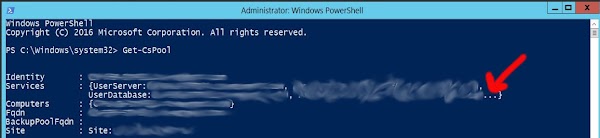
Sometimes, PowerShell will truncate your command output: Uggh... how annoying. Why do you hide things from me, PowerShell? Thankfully, this is easy to correct. There is an environment variable in PowerShell for 'EnumerationLimit' (i.e. the number of items enumerated to the screen during a session): Setting this variable to -1 essentially allows for unlimited enumeration. I hope you find this helpful.


