Posts

I have been helping a client set up Skype for Business Online Call Queues. This morning, they told me they were able to call the service number associated with a queue and hear the greeting, but none of the agents in the queue received the call. Normally, this just works. I logged into their tenant and didn't see anything suspicious in their queue or group setup. Also, all the users in a queue they were testing with had Cloud PBX licenses applied. What's going on? 😕 I was grasping for straws, but I decided to check the 'external communications' settings on the tenant. I noticed the client was whitelisting companies to federate with, but they did not include their own domain. Should you have to allow your own domain? Well, if you're whitelisting domains on your tenant, turns out the answer is 'yes' (you'll also need to allow Microsoft as well). In the Skype for Business Admin Panel on your tenant click 'organization' then 'external co...
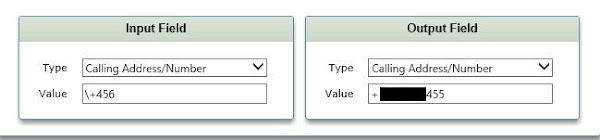
I've had multiple clients approach me with the same scenario in Skype for Business/Lync 2013: <NAME> in <DEPARTMENT> wants to change the caller id for their individual DID or extension to a different number. For clients that have a Sonus 1k/2k SBC, this is very easy to do. Transformation rules on the Sonus 1k/2k SBC allow for manipulating the 'Calling Party Address/Number' field. The 'Calling Party' is who initiates the call. If we change the calling party from the users number to the number they want, that addresses their issue. First, we create a transformation rule. Below are examples for both an e164 number and an extension: Extenstion Example E164 Example Lastly, we'll also need to include a 'catch all' rule. The 'catch all' rule catches any other number and passes it through without manipulation. Below is an example: Catch All Example After our rules are created, we'll need to make sure they are order...

A customer contacted me with an inbound call issue. Inbound calls were taking at least 30 seconds to connect, and some would not connect at all. While I've experienced call delays before, the root cause was different each time I investigated. Since the issue was happening so frequently, I took a SIP trace from their Audio Codes Gateway. I noticed the following pattern in the SIP trace: INVITE SIP 183 INVITE SIP 183 CANCEL 200 OK If everything was working correctly, *I should* see the SIP 183 answered with a '200 OK' rather than an additional SIP 183. My initial thought was, "Why isn't the carrier answering my 183 message?" I spoke with an engineer from the carrier (AT&T) and he provided logs from his end showing they were, in fact, answering my SIP 183. The customer side, however, was not sending the SIP 200 back to them. What's going on here? The carrier's log proved they weren't causing the problem. The other time I've exper...

Taking the 70-333 Exam soon? If so, you'll want to check out this book written by Michael Tressler (aka, flinchbot ). I found this book super helpful when preparing for my exam (which I passed in April 2017, by the way, with a 975 😉) and it does a really good job of covering all aspects of Enterprise Voice. Hands on experience is the best teacher, in my opinion, but I would recommend using this book as a study/reference guide. Time to study for my Office 365 Exams. MCSE Productivity , here I come!


